First Install Netframework: (require for Quick Launch Installation).
Net framework 2.0
Download
DRIVERS (18)
Chipset
Intel Chipset Installation Utility
Version 9.1.1.1015 A 2.2MB (xp, vista, 7)
Download
Storage
Intel Matrix Storage Manager Driver
Version:8.9.2.1002 A, 18.17M
Download
Graphic/VGA
Mobile Intel 4 Series Express Chipset Family Graphics Driver
Version 1.00 REV A 19.28MB
Download
Nvidia GeForce G 105M/G 103M For windows XP
Version 2.66.58WHQL 118MB
Download
Audio Drivers:
Since there are no best single driver available, you have to follow this step carefully.
1. Install MS-UAA first:
Windows XP, XP SP2: Download (KB888111)
Windows XP SP3: Download (KB835221)
Restart and then install audio drivers below.
2. Install the Audio:
IDT High Definition Audio Codec
(2 drivers, if the first one didn't work, use 2nd drivers)
Download (SP41693)
Download (SP39671)
If resulting in error, ignore it and proceed by manually install the drivers:
Download and install the driver, you will get the error while installing.
Perform the below steps to fix the issue.
1. Click on Start and select Run. Now type devmgmt.msc and press enter.
2. Right click on "Audio device on High Definition Audio Bus" and click Update driver.
3. Select "Install from a list or specific location".
4. Click Next. Then select "Don't search, I will choose the driver to install".
5. Click Next and then select "Sound, video and game controller" from the list.
6. Click Next and then click Have Disk.
7. Click Browse C:\swsetup\sp39671 folder and select the .inf file and click open and Continue with the onscreen instructions.
Fo instruction with pictures read here:
Manually install Audio Drivers.
Wireless:
(3 drivers, choose 1 base on your specification)
Broadcom 4313 a/b/g/n wireless Drivers
Version5.10.91.8 10MB
Download
Intel PRO/Wireless Drivers:
(requires windows installer 3.0 installed first)
Version 5.20 4MB
Download
Atheros Wireless LAN Driver:
Version 2.00B 20.64MB
Download
Bluetooth:
HP Integrated Module with Bluetooth Wireless Technology
Version 5.1E 94.68M
Download
Modem
High-Definition Audio (HDA) Modem Installer and Driver
Version 1.00 A 12.71MB
Download
Lan/Ethernet
Realtek RTL8102E Family PCI-E Fast Ethernet NIC
Verison 1.00A 4.8MB
Download
updates available here
Card Reader
JMB38X Card Reader Host Controller
Version 1.00A 3.49MB
Download
Touchpad:
Synaptics Touchpad Driver
Version:9.1.11 Q, 16.93M
Download
Button:
(Install netframework 2.0 first)
HP Quick-launch Button
Version 6.40B 19MB
Download
Camera
Cyberlink youcam software 2.0 + Driver
Version 2.0.2519 46MB
Download
Others
Lightscribe system software
Version 1.18.1.1 A 8.4MB
Download
ADDITIONAL INFORMATION
1. If you have 7 unknown device, download this file, extract, then right lick on the inf file and select install(Machine.inf)
FOR NVIDIA: if the driver above resulting in error use modded driver below:
Download
3-step process to install:
1. Download driver, double click and select extract,
2. Download modded INF and replace original INF in extracted folder,
3. Install and reboot
Wednesday, October 28, 2009

Tuesday, October 27, 2009
Toshiba Dynabook SS MX/290 Windows XP Drivers
Another product from japan and maybe difficult to find the proper drivers, here i listed what i found.
Intel Wireless LAN Driver
part1 part2 part3 part4 part5
Chipset Driver
Download
Dynabook SS MX/290 Display Driver
part1 part2
Sound Driver
Download
Dynabook SS MX/290 TouchPad Driver
part1 part2
Dynabook SS MX/290 InfraRed Driver
Download
Dynabook SS MX/290 Modem Driver
Download
Dynabook SS MX/290 DVD-RAM Driver
part1 part2 part3 part4 part5 part6 part7 part8 part9 part10
Intel Wireless LAN Driver
part1 part2 part3 part4 part5
Chipset Driver
Download
Dynabook SS MX/290 Display Driver
part1 part2
Sound Driver
Download
Dynabook SS MX/290 TouchPad Driver
part1 part2
Dynabook SS MX/290 InfraRed Driver
Download
Dynabook SS MX/290 Modem Driver
Download
Dynabook SS MX/290 DVD-RAM Driver
part1 part2 part3 part4 part5 part6 part7 part8 part9 part10
Extracting SATA driver Without Floppy
Ok this time I delete the older post because the mwthod are complicated, and now i found the easier way to do this:
THINGS NEEDED BEFORE START:
1. Intel AHCI8 SATA DRIVER: DOWNLOAD
2. WINRAR SOFTWARE: DOWNLOAD
NOTE: Download the intel SATA drivers named 32-bit Floppy Configuration Utility
-by downloading this utilities must accepted microsoft software license and agreement-
1. Install winrar.
2. Download Intel AHCI8 sata driver.
3. Right click on the sata driver (named f6flpy3286) and select extract files.

4. Press Ok.

5. You will get a f6flpy3286 folder after extract it.

6. Open the folder. now you will see the sata drivers you need to use for the slipstream.

Return to slipstream guide to install windows XP.
THINGS NEEDED BEFORE START:
1. Intel AHCI8 SATA DRIVER: DOWNLOAD
2. WINRAR SOFTWARE: DOWNLOAD
NOTE: Download the intel SATA drivers named 32-bit Floppy Configuration Utility
-by downloading this utilities must accepted microsoft software license and agreement-
1. Install winrar.
2. Download Intel AHCI8 sata driver.
3. Right click on the sata driver (named f6flpy3286) and select extract files.

4. Press Ok.

5. You will get a f6flpy3286 folder after extract it.

6. Open the folder. now you will see the sata drivers you need to use for the slipstream.

Return to slipstream guide to install windows XP.
Slipstreaming Guide To install Windows XP
In 2009, Serial ATA (SATA) has mostly replaced parallel ATA. So installing Windows XP will cause BSOD for certain model, to solve the problems we need to integrate SATA into windows XP Installation disk and this process called slipstream.
Content:
A :Materiel Needed
B: Sata Driver Download
C: Slipstream Guide
Material needed:
1.Nlite Software: Download Here
2. Windows XP CD
3. Empty CD-R/DVD-R
Sata Driver Download
Extract the driver using winrar.
Intel Sata Driver: Download Guide (Intel has moved the download link)
AMD Sata Driver: Download
Nvidia Sata Driver: Download
How to check my model need Intel, AMD or Nvidia sata drivers?
Install CPU-z and run the program, look at the chipset on mainboard tab.
 it will show you what type of Chipset you have AMD/ATI, Intel or Nvidia, so select the Sata base on your chipset.
additional info:
If you want more details with pictures, you can read my post: Sata driver for slipstream process here.
If you download the sata directly from Intel (for Intel model), you can found the instruction to extract it here.
Slipstream Guide
1. create a new folder and name it as "WINXP" or any name you like, copy all the content in your xp installation disk (explore cd and press ctrl+A) and paste it in the new folder you just created.
2.Extract the sata driver you downloaded.
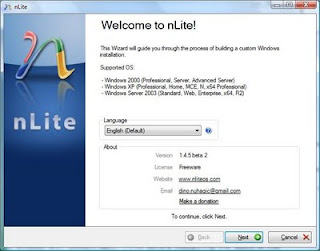
3. Intsall Nlite and run it. On the first screen just click next.
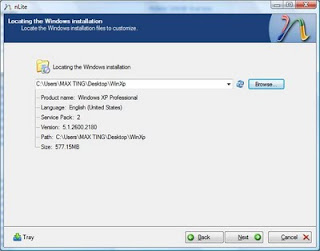
4. Now locate/browse to the folder "WINXP" you created.
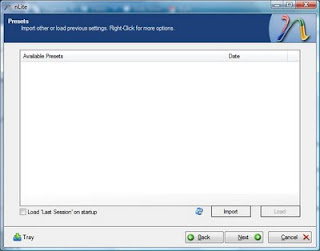
5.Next and you will come to "Presets", ignore this and click "Next".
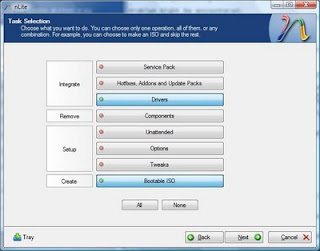
6. In "Task Selection", choose "Drivers" and "Bootable ISO" by high-lighting them.
7. For intel select single driver
For amd select multiple driver
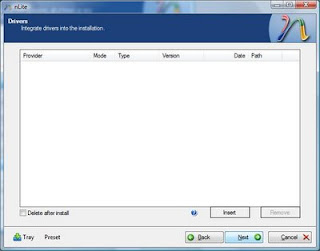
8. For intel Browse to the SATA driver folder which you extracted earlier(I named it "Floppy32Bit") and select either one of the .INF file, i suggest "iaahci.inf".
-for amd browse to raid 7xx, slect x86 and select the inf files.
SELECT ONLY x86.
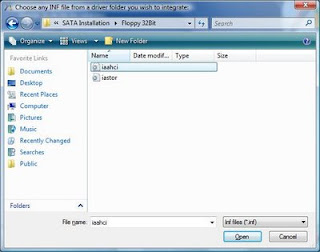
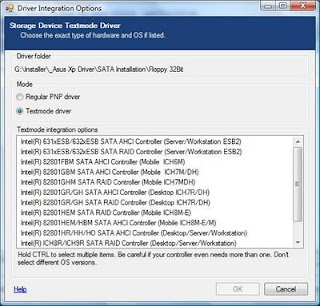
9) A screen like below will pop-up, make sure it's "Textmode driver" and select all of them by holding CTRL+A key and choose "OK", the pictures below for intel installation.
If you arrive at this step for installation its similar for both amd and intel.
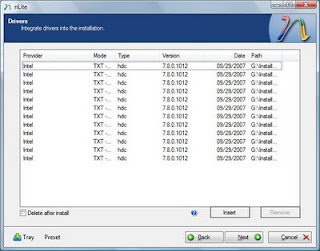
10) You shall see something like this. Choose "Next" and you will be prompted.
11) Choose "Yes" to start the process.
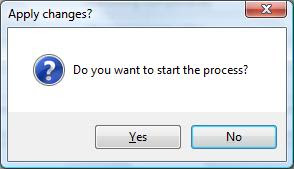
12) Let it finish and choose "Next".
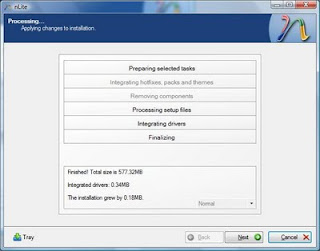
13) Finally, you can create your project as ISO image or burn it directly to CD-R under "Mode". choose "Direct Burn". You can put anything for "Label" but not too long. Choose "Burn" and you will be prompted again. You can also choose to create iso to burn using software such as nero.
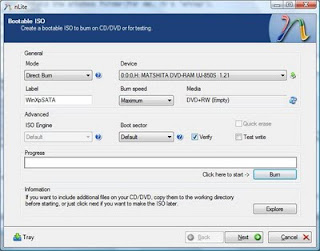
14) Choose "Yes" to burn it to CD-R. Wait for it to finish and choose "Next"
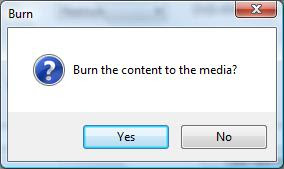
15) Choose "Finish" to exit nLite.
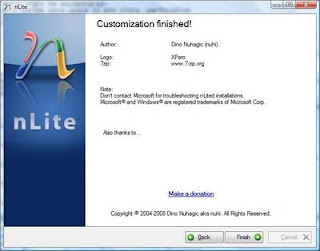 Additional notes.
-If your slipstreaming process unsuccessful, you can repeat the process but create a new folder and DO NOT USE THE SAME FOLDER.
Content:
A :Materiel Needed
B: Sata Driver Download
C: Slipstream Guide
Material needed:
1.Nlite Software: Download Here
2. Windows XP CD
3. Empty CD-R/DVD-R
Sata Driver Download
Extract the driver using winrar.
Intel Sata Driver: Download Guide (Intel has moved the download link)
AMD Sata Driver: Download
Nvidia Sata Driver: Download
How to check my model need Intel, AMD or Nvidia sata drivers?
Install CPU-z and run the program, look at the chipset on mainboard tab.
additional info:
If you want more details with pictures, you can read my post: Sata driver for slipstream process here.
If you download the sata directly from Intel (for Intel model), you can found the instruction to extract it here.
Slipstream Guide
1. create a new folder and name it as "WINXP" or any name you like, copy all the content in your xp installation disk (explore cd and press ctrl+A) and paste it in the new folder you just created.
2.Extract the sata driver you downloaded.
3. Intsall Nlite and run it. On the first screen just click next.

4. Now locate/browse to the folder "WINXP" you created.

5.Next and you will come to "Presets", ignore this and click "Next".

6. In "Task Selection", choose "Drivers" and "Bootable ISO" by high-lighting them.

7. For intel select single driver
For amd select multiple driver

8. For intel Browse to the SATA driver folder which you extracted earlier(I named it "Floppy32Bit") and select either one of the .INF file, i suggest "iaahci.inf".
-for amd browse to raid 7xx, slect x86 and select the inf files.
SELECT ONLY x86.

9) A screen like below will pop-up, make sure it's "Textmode driver" and select all of them by holding CTRL+A key and choose "OK", the pictures below for intel installation.
If you arrive at this step for installation its similar for both amd and intel.

10) You shall see something like this. Choose "Next" and you will be prompted.

11) Choose "Yes" to start the process.

12) Let it finish and choose "Next".

13) Finally, you can create your project as ISO image or burn it directly to CD-R under "Mode". choose "Direct Burn". You can put anything for "Label" but not too long. Choose "Burn" and you will be prompted again. You can also choose to create iso to burn using software such as nero.

14) Choose "Yes" to burn it to CD-R. Wait for it to finish and choose "Next"

15) Choose "Finish" to exit nLite.
 Additional notes.
-If your slipstreaming process unsuccessful, you can repeat the process but create a new folder and DO NOT USE THE SAME FOLDER.
Compaq Presario CQ40-538TU Windows XP Drivers
First Install Netframework: (require for Quick Launch Installation).
Net framework 2.0
Download
DRIVERS (18)
Chipset
Intel Chipset Installation Utility
Version 9.1.1.1015 A 2.2MB (xp, vista, 7)
Download
Storage
Intel Matrix Storage Manager Driver
Version:8.9.2.1002 A, 18.17M
Download
Graphic/VGA
Mobile Intel 4 Series Express Chipset Family Graphics Driver
Version 1.00 REV A 19.28MB
Download
Nvidia GeForce G 105M/G 103M For windows XP
Version 2.66.58WHQL 118MB
Download
Audio Drivers:
Since there are no best single driver available, you have to follow this step carefully.
1. Install MS-UAA first:
Windows XP, XP SP2: Download (KB888111)
Windows XP SP3: Download (KB835221)
Restart and then install audio drivers below.
2. Install the Audio:
IDT High Definition Audio Codec
(2 drivers, if the first one didn't work, use 2nd drivers)
Download (SP41693)
Download (SP39671)
If resulting in error, ignore it and proceed by manually install the drivers:
Download and install the driver, you will get the error while installing.
Perform the below steps to fix the issue.
1. Click on Start and select Run. Now type devmgmt.msc and press enter.
2. Right click on "Audio device on High Definition Audio Bus" and click Update driver.
3. Select "Install from a list or specific location".
4. Click Next. Then select "Don't search, I will choose the driver to install".
5. Click Next and then select "Sound, video and game controller" from the list.
6. Click Next and then click Have Disk.
7. Click Browse C:\swsetup\sp39671 folder and select the .inf file and click open and Continue with the onscreen instructions.
Fo instruction with pictures read here:
Manually install Audio Drivers.
Wireless:
(3 drivers, choose 1 base on your specification)
Broadcom 4313 a/b/g/n wireless Drivers
Version5.10.91.8 10MB
Download
Intel PRO/Wireless Drivers:
(requires windows installer 3.0 installed first)
Version 5.20 4MB
Download
Atheros Wireless LAN Driver:
Version 2.00B 20.64MB
Download
Bluetooth:
HP Integrated Module with Bluetooth Wireless Technology
Version 5.1E 94.68M
Download
Modem
High-Definition Audio (HDA) Modem Installer and Driver
Version 1.00 A 12.71MB
Download
Lan/Ethernet
Realtek RTL8102E Family PCI-E Fast Ethernet NIC
Verison 1.00A 4.8MB
Download
updates available here
Card Reader
JMB38X Card Reader Host Controller
Version 1.00A 3.49MB
Download
Touchpad:
Synaptics Touchpad Driver
Version:9.1.11 Q, 16.93M
Download
Button:
(Install netframework 2.0 first)
HP Quick-launch Button
Version 6.40B 19MB
Download
Camera
Cyberlink youcam software 2.0 + Driver
Version 2.0.2519 46MB
Download
Others
Lightscribe system software
Version 1.18.1.1 A 8.4MB
Download
ADDITIONAL INFORMATION
1. If you have 7 unknown device, download this file, extract, then right lick on the inf file and select install(Machine.inf)
FOR NVDIA: if the driver above resulting in error use modded driver below:
Download
3-step process to install:
1. Download driver, double click and select extract,
2. Download modded INF and replace original INF in extracted folder,
3. Install and reboot
Net framework 2.0
Download
DRIVERS (18)
Chipset
Intel Chipset Installation Utility
Version 9.1.1.1015 A 2.2MB (xp, vista, 7)
Download
Storage
Intel Matrix Storage Manager Driver
Version:8.9.2.1002 A, 18.17M
Download
Graphic/VGA
Mobile Intel 4 Series Express Chipset Family Graphics Driver
Version 1.00 REV A 19.28MB
Download
Nvidia GeForce G 105M/G 103M For windows XP
Version 2.66.58WHQL 118MB
Download
Audio Drivers:
Since there are no best single driver available, you have to follow this step carefully.
1. Install MS-UAA first:
Windows XP, XP SP2: Download (KB888111)
Windows XP SP3: Download (KB835221)
Restart and then install audio drivers below.
2. Install the Audio:
IDT High Definition Audio Codec
(2 drivers, if the first one didn't work, use 2nd drivers)
Download (SP41693)
Download (SP39671)
If resulting in error, ignore it and proceed by manually install the drivers:
Download and install the driver, you will get the error while installing.
Perform the below steps to fix the issue.
1. Click on Start and select Run. Now type devmgmt.msc and press enter.
2. Right click on "Audio device on High Definition Audio Bus" and click Update driver.
3. Select "Install from a list or specific location".
4. Click Next. Then select "Don't search, I will choose the driver to install".
5. Click Next and then select "Sound, video and game controller" from the list.
6. Click Next and then click Have Disk.
7. Click Browse C:\swsetup\sp39671 folder and select the .inf file and click open and Continue with the onscreen instructions.
Fo instruction with pictures read here:
Manually install Audio Drivers.
Wireless:
(3 drivers, choose 1 base on your specification)
Broadcom 4313 a/b/g/n wireless Drivers
Version5.10.91.8 10MB
Download
Intel PRO/Wireless Drivers:
(requires windows installer 3.0 installed first)
Version 5.20 4MB
Download
Atheros Wireless LAN Driver:
Version 2.00B 20.64MB
Download
Bluetooth:
HP Integrated Module with Bluetooth Wireless Technology
Version 5.1E 94.68M
Download
Modem
High-Definition Audio (HDA) Modem Installer and Driver
Version 1.00 A 12.71MB
Download
Lan/Ethernet
Realtek RTL8102E Family PCI-E Fast Ethernet NIC
Verison 1.00A 4.8MB
Download
updates available here
Card Reader
JMB38X Card Reader Host Controller
Version 1.00A 3.49MB
Download
Touchpad:
Synaptics Touchpad Driver
Version:9.1.11 Q, 16.93M
Download
Button:
(Install netframework 2.0 first)
HP Quick-launch Button
Version 6.40B 19MB
Download
Camera
Cyberlink youcam software 2.0 + Driver
Version 2.0.2519 46MB
Download
Others
Lightscribe system software
Version 1.18.1.1 A 8.4MB
Download
ADDITIONAL INFORMATION
1. If you have 7 unknown device, download this file, extract, then right lick on the inf file and select install(Machine.inf)
FOR NVDIA: if the driver above resulting in error use modded driver below:
Download
3-step process to install:
1. Download driver, double click and select extract,
2. Download modded INF and replace original INF in extracted folder,
3. Install and reboot
Monday, October 26, 2009
Compaq Presario CQ40-627TU Windows XP Drivers
First Install Netframework: (require for Quick Launch Installation).
Net framework 2.0
Download
DRIVERS (18)
Chipset
Intel Chipset Installation Utility
Version 9.1.1.1015 A 2.2MB (xp, vista, 7)
Download
Storage
Intel Matrix Storage Manager Driver
Version:8.9.2.1002 A, 18.17M
Download
Graphic/VGA
Mobile Intel 4 Series Express Chipset Family Graphics Driver
Version 1.00 REV A 19.28MB
Download
Nvidia GeForce G 105M/G 103M For windows XP
Version 2.66.58WHQL 118MB
Download
Audio Drivers:
Since there are no best single driver available, you have to follow this step carefully.
1. Install MS-UAA first:
Windows XP, XP SP2: Download (KB888111)
Windows XP SP3: Download (KB835221)
Restart and then install audio drivers below.
2. Install the Audio:
IDT High Definition Audio Codec
(2 drivers, if the first one didn't work, use 2nd drivers)
Download (SP41693)
Download (SP39671)
If resulting in error, ignore it and proceed by manually install the drivers:
Download and install the driver, you will get the error while installing.
Perform the below steps to fix the issue.
1. Click on Start and select Run. Now type devmgmt.msc and press enter.
2. Right click on "Audio device on High Definition Audio Bus" and click Update driver.
3. Select "Install from a list or specific location".
4. Click Next. Then select "Don't search, I will choose the driver to install".
5. Click Next and then select "Sound, video and game controller" from the list.
6. Click Next and then click Have Disk.
7. Click Browse C:\swsetup\sp39671 folder and select the .inf file and click open and Continue with the onscreen instructions.
Fo instruction with pictures read here:
Manually install Audio Drivers.
Wireless:
(3 drivers, choose 1 base on your specification)
Broadcom 4313 a/b/g/n wireless Drivers
Version5.10.91.8 10MB
Download
Intel PRO/Wireless Drivers:
(requires windows installer 3.0 installed first)
Version 5.20 4MB
Download
Atheros Wireless LAN Driver:
Version 2.00B 20.64MB
Download
Bluetooth:
HP Integrated Module with Bluetooth Wireless Technology
Version 5.1E 94.68M
Download
Modem
High-Definition Audio (HDA) Modem Installer and Driver
Version 1.00 A 12.71MB
Download
Lan/Ethernet
Realtek RTL8102E Family PCI-E Fast Ethernet NIC
Verison 1.00A 4.8MB
Download
updates available here
Card Reader
JMB38X Card Reader Host Controller
Version 1.00A 3.49MB
Download
Touchpad:
Synaptics Touchpad Driver
Version:9.1.11 Q, 16.93M
Download
Button:
(Install netframework 2.0 first)
HP Quick-launch Button
Version 6.40B 19MB
Download
Camera
Cyberlink youcam software 2.0 + Driver
Version 2.0.2519 46MB
Download
Others
Lightscribe system software
Version 1.18.1.1 A 8.4MB
Download
ADDITIONAL INFORMATION
1. If you have 7 unknown device, download this file, extract, then right lick on the inf file and select install(Machine.inf)
FOR NVIDIA: if the driver above resulting in error use modded driver below:
Download
3-step process to install:
1. Download driver, double click and select extract,
2. Download modded INF and replace original INF in extracted folder,
3. Install and reboot
Net framework 2.0
Download
DRIVERS (18)
Chipset
Intel Chipset Installation Utility
Version 9.1.1.1015 A 2.2MB (xp, vista, 7)
Download
Storage
Intel Matrix Storage Manager Driver
Version:8.9.2.1002 A, 18.17M
Download
Graphic/VGA
Mobile Intel 4 Series Express Chipset Family Graphics Driver
Version 1.00 REV A 19.28MB
Download
Nvidia GeForce G 105M/G 103M For windows XP
Version 2.66.58WHQL 118MB
Download
Audio Drivers:
Since there are no best single driver available, you have to follow this step carefully.
1. Install MS-UAA first:
Windows XP, XP SP2: Download (KB888111)
Windows XP SP3: Download (KB835221)
Restart and then install audio drivers below.
2. Install the Audio:
IDT High Definition Audio Codec
(2 drivers, if the first one didn't work, use 2nd drivers)
Download (SP41693)
Download (SP39671)
If resulting in error, ignore it and proceed by manually install the drivers:
Download and install the driver, you will get the error while installing.
Perform the below steps to fix the issue.
1. Click on Start and select Run. Now type devmgmt.msc and press enter.
2. Right click on "Audio device on High Definition Audio Bus" and click Update driver.
3. Select "Install from a list or specific location".
4. Click Next. Then select "Don't search, I will choose the driver to install".
5. Click Next and then select "Sound, video and game controller" from the list.
6. Click Next and then click Have Disk.
7. Click Browse C:\swsetup\sp39671 folder and select the .inf file and click open and Continue with the onscreen instructions.
Fo instruction with pictures read here:
Manually install Audio Drivers.
Wireless:
(3 drivers, choose 1 base on your specification)
Broadcom 4313 a/b/g/n wireless Drivers
Version5.10.91.8 10MB
Download
Intel PRO/Wireless Drivers:
(requires windows installer 3.0 installed first)
Version 5.20 4MB
Download
Atheros Wireless LAN Driver:
Version 2.00B 20.64MB
Download
Bluetooth:
HP Integrated Module with Bluetooth Wireless Technology
Version 5.1E 94.68M
Download
Modem
High-Definition Audio (HDA) Modem Installer and Driver
Version 1.00 A 12.71MB
Download
Lan/Ethernet
Realtek RTL8102E Family PCI-E Fast Ethernet NIC
Verison 1.00A 4.8MB
Download
updates available here
Card Reader
JMB38X Card Reader Host Controller
Version 1.00A 3.49MB
Download
Touchpad:
Synaptics Touchpad Driver
Version:9.1.11 Q, 16.93M
Download
Button:
(Install netframework 2.0 first)
HP Quick-launch Button
Version 6.40B 19MB
Download
Camera
Cyberlink youcam software 2.0 + Driver
Version 2.0.2519 46MB
Download
Others
Lightscribe system software
Version 1.18.1.1 A 8.4MB
Download
ADDITIONAL INFORMATION
1. If you have 7 unknown device, download this file, extract, then right lick on the inf file and select install(Machine.inf)
FOR NVIDIA: if the driver above resulting in error use modded driver below:
Download
3-step process to install:
1. Download driver, double click and select extract,
2. Download modded INF and replace original INF in extracted folder,
3. Install and reboot
Compaq Presario CQ40-401AX Windows XP Drivers
PATCH
First Install Netframework: (require for Quick Launch Installation).
Net framework 2.0
Download
Netframework 3.5
Download
DRIVERS (18)
Sata
AMD SATA AHCI Controller Driver
Version 3.1.1540.64 REV: A 5.24MB
Download
Graphic/VGA
AMD High-Definition Graphics Driver
Version:8.753.0.0, 178.42M
Download
ATI VGA Driver (ATI Mobility Radeon)
Version:8.672.0.0 A, 106.21M
(strongly recommended to install Microsoft netframework 2.0 and 3.5)
Download
Audio Drivers:
Since there are no best single driver available, you have to follow this step carefully.
1. Install MS-UAA first:
Windows XP, XP SP2: Download (KB888111)
Windows XP SP3: Download (KB835221)
Restart and then install audio drivers below.
2. Install the Audio:
IDT High Definition Audio Codec
(2 drivers, if the first one didn't work, use 2nd drivers)
Download (SP41693)
Download (SP39671)
If resulting in error, ignore it and proceed by manually install the drivers:
Download and install the driver, you will get the error while installing.
Perform the below steps to fix the issue.
1. Click on Start and select Run. Now type devmgmt.msc and press enter.
2. Right click on "Audio device on High Definition Audio Bus" and click Update driver.
3. Select "Install from a list or specific location".
4. Click Next. Then select "Don't search, I will choose the driver to install".
5. Click Next and then select "Sound, video and game controller" from the list.
6. Click Next and then click Have Disk.
7. Click Browse C:\swsetup\sp39671 folder and select the .inf file and click open and Continue with the onscreen instructions.
Fo instruction with pictures read here:
Manually install Audio Drivers.
Wireless:
(3 drivers, choose 1 base on your specification)
Broadcom 4313 a/b/g/n wireless Drivers
Version5.10.91.8 10MB
Download
Intel PRO/Wireless Drivers:
(requires windows installer 3.0 installed first)
Version 5.20 4MB
Download
Atheros Wireless LAN Driver:
Version 2.00B 20.64MB
Download
Bluetooth:
HP Integrated Module with Bluetooth Wireless Technology
Version 5.1E 94.68M
Download
Modem
High-Definition Audio (HDA) Modem Installer and Driver
Version 1.00 A 12.71MB
Download
Lan/Ethernet
Realtek RTL8102E Family PCI-E Fast Ethernet NIC
Verison 1.00A 4.8MB
Download
updates available here
Card Reader
JMB38X Card Reader Host Controller
Version 1.00A 3.49MB
Download
Touchpad:
Synaptics Touchpad Driver
Version:9.1.11 Q, 16.93M
Download
Button:
(Install netframework 2.0 first)
HP Quick-launch Button
Version 6.40B 19MB
Download
Camera
Cyberlink youcam software 2.0 + Driver
Version 2.0.2519 46MB
Download
Others
Lightscribe system software
Version 1.18.1.1 A 8.4MB
Download
ADDITIONAL INFORMATION
1. If you have 7 unknown device, download this file, extract, then right click on the inf file and select install(Machine.inf)
2. If you need HDMI Driver Download
3. Chipset driver can be download directly from AMD and in your graphic driver folder. By default the folder name is SMbus in c:\ati
First Install Netframework: (require for Quick Launch Installation).
Net framework 2.0
Download
Netframework 3.5
Download
DRIVERS (18)
Sata
AMD SATA AHCI Controller Driver
Version 3.1.1540.64 REV: A 5.24MB
Download
Graphic/VGA
AMD High-Definition Graphics Driver
Version:8.753.0.0, 178.42M
Download
ATI VGA Driver (ATI Mobility Radeon)
Version:8.672.0.0 A, 106.21M
(strongly recommended to install Microsoft netframework 2.0 and 3.5)
Download
Audio Drivers:
Since there are no best single driver available, you have to follow this step carefully.
1. Install MS-UAA first:
Windows XP, XP SP2: Download (KB888111)
Windows XP SP3: Download (KB835221)
Restart and then install audio drivers below.
2. Install the Audio:
IDT High Definition Audio Codec
(2 drivers, if the first one didn't work, use 2nd drivers)
Download (SP41693)
Download (SP39671)
If resulting in error, ignore it and proceed by manually install the drivers:
Download and install the driver, you will get the error while installing.
Perform the below steps to fix the issue.
1. Click on Start and select Run. Now type devmgmt.msc and press enter.
2. Right click on "Audio device on High Definition Audio Bus" and click Update driver.
3. Select "Install from a list or specific location".
4. Click Next. Then select "Don't search, I will choose the driver to install".
5. Click Next and then select "Sound, video and game controller" from the list.
6. Click Next and then click Have Disk.
7. Click Browse C:\swsetup\sp39671 folder and select the .inf file and click open and Continue with the onscreen instructions.
Fo instruction with pictures read here:
Manually install Audio Drivers.
Wireless:
(3 drivers, choose 1 base on your specification)
Broadcom 4313 a/b/g/n wireless Drivers
Version5.10.91.8 10MB
Download
Intel PRO/Wireless Drivers:
(requires windows installer 3.0 installed first)
Version 5.20 4MB
Download
Atheros Wireless LAN Driver:
Version 2.00B 20.64MB
Download
Bluetooth:
HP Integrated Module with Bluetooth Wireless Technology
Version 5.1E 94.68M
Download
Modem
High-Definition Audio (HDA) Modem Installer and Driver
Version 1.00 A 12.71MB
Download
Lan/Ethernet
Realtek RTL8102E Family PCI-E Fast Ethernet NIC
Verison 1.00A 4.8MB
Download
updates available here
Card Reader
JMB38X Card Reader Host Controller
Version 1.00A 3.49MB
Download
Touchpad:
Synaptics Touchpad Driver
Version:9.1.11 Q, 16.93M
Download
Button:
(Install netframework 2.0 first)
HP Quick-launch Button
Version 6.40B 19MB
Download
Camera
Cyberlink youcam software 2.0 + Driver
Version 2.0.2519 46MB
Download
Others
Lightscribe system software
Version 1.18.1.1 A 8.4MB
Download
ADDITIONAL INFORMATION
1. If you have 7 unknown device, download this file, extract, then right click on the inf file and select install(Machine.inf)
2. If you need HDMI Driver Download
3. Chipset driver can be download directly from AMD and in your graphic driver folder. By default the folder name is SMbus in c:\ati
Subscribe to:
Posts (Atom)